

TLDR:
- Do not include references on your resume or add “references available upon request”; this phrase is outdated, wastes valuable space, and employers already know they can request references when needed
- Create a separate reference sheet (not on your resume) with 3-5 professional contacts, matching your resume’s formatting and including: full name, current job title and company, relationship context, phone number, and email address
- Choose the right references: prioritize former direct managers (strongest), then senior colleagues or team leads, clients (for client-facing roles), or professors (for recent graduates); never use family, friends, or anyone you haven’t contacted in 3+ years
- Always ask permission before listing someone as a reference, provide them with your current resume, share the types of roles you’re pursuing, and keep them informed when they might be contacted
- Only provide references when explicitly requested by employers, typically during final interview stages or pre-employment verification, not during initial application submission
Should you include references on your resume? The short answer: no. But there’s more to the story.
What Are Resume References?
Resume references are professional contacts who can vouch for your work ethic, skills, and accomplishments. They’re typically former managers, colleagues, or clients who’ve worked closely with you and can speak credibly about your qualifications.
Here’s what matters: references don’t belong on your resume itself. They go on a separate reference sheet that you provide only when requested, usually later in the hiring process after initial interviews.
Why? Your resume has one job: get you past Applicant Tracking Systems and convince recruiters to interview you. References don’t contribute to that goal. They take up space that should showcase your achievements, skills, and experience.
The modern job search reality: With recruiters spending an average of 7.4 seconds on initial resume reviews and ATS systems filtering up to 75% of applications, every line on your resume needs to work hard. Understanding when references actually matter is crucial: according to the Society for Human Resource Management, 92% of employers conduct some sort of reference check on employment candidates, but usually as part of the pre-employment screening process. Meaning after you’ve already impressed them with your resume. A “references available upon request” line does nothing to advance your candidacy.
Do You Need References on a Resume?
No. Here’s why this outdated practice persists and why you should skip it:
Why “References Available Upon Request” Is Obsolete
This phrase was standard on resumes decades ago when the hiring process moved slower and resume space was less competitive. Today, it’s redundant as employers already know they can ask for references.
What this line actually communicates:
The space opportunity cost: That line could instead be a quantified achievement that demonstrates your value. For example:
❌ Weak:
“References available upon request”
✅ Strong:
“Reduced customer response time by 34% by implementing automated ticketing system”
Every line of your resume should demonstrate value, so learn more about optimizing your resume sections.
When Employers Actually Want References
Employers request references at specific stages in the hiring process:
| Hiring Stage | Reference Likelihood | What Happens |
|---|---|---|
| Application submission | Never | ATS scans for keywords and qualifications |
| Initial resume review | Rarely | Recruiters assess basic fit |
| Phone screening | Occasionally | May ask if references are available |
| First interview | Sometimes | May request reference contact details |
| Final interview stage | Very likely | Formal reference check before offer |
| Offer negotiation | Always | Standard pre-employment verification |
Bottom line: You’ll know when references are needed because employers will explicitly ask for them. Until then, focus your resume on demonstrating why you’re the right candidate.
How to List References on a Resume (When You Must)
Some job applications specifically require references as part of the submission. Even then, create a separate reference sheet and don’t clutter your actual resume.
Creating a Professional Reference Sheet
Your reference sheet should match your resume’s formatting for visual consistency. Here’s the proper structure:
Header (matching your resume):
Your Name
(555) 234-5678 | your_name@email.com | linkedin.com/in/yourname
Reference entries (3-5 contacts):
Reference Name
Job Title
Company Name
Phone: (555) 123-4567
Email: references@email.com
Relationship: Direct Manager for 3 years
Essential Information for Each Reference
Include these details for every reference:
Pro tip: Add a brief context note explaining your working relationship, especially if the connection isn’t obvious. “Supervised my work on the digital transformation project” provides more context than just “Former manager.”
Reference Sheet Formatting Best Practices
Match your resume design: Use the same fonts, colors, and header style as your resume. This creates a cohesive application package.
Keep it to one page: Three to five references are sufficient. More than that overwhelms hiring managers.
Use consistent spacing: Each reference entry should follow the same format with clear visual separation.
Save as PDF: Like your resume, save your reference sheet as a PDF to preserve formatting across different systems.
Who to Put as References on Resume
The right references can strengthen your candidacy. The wrong ones can raise red flags or provide lukewarm endorsements that hurt more than help.
Best Reference Types
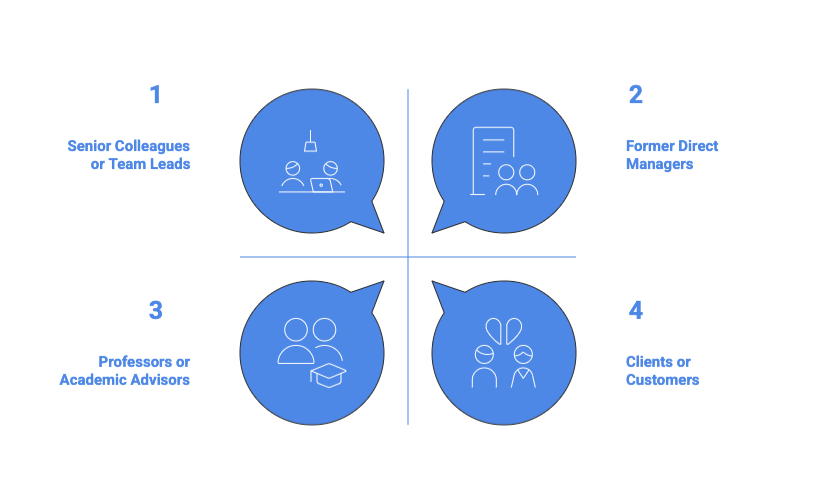
1. Former Direct Managers (Strongest)
Your previous supervisors can speak directly to your work quality, reliability, and professional growth. They carry the most weight with hiring managers.
What makes them effective:
2. Senior Colleagues or Team Leads
If a direct manager isn’t available, senior colleagues who worked closely with you are your next best option.
When to use them:
3. Clients or Customers (For Client-Facing Roles)
External references demonstrate your ability to build relationships and deliver results beyond your organization.
Best for:
4. Professors or Academic Advisors (For Recent Graduates)
Academic references work when you lack extensive professional experience.
Use when:
Who NOT to Use as References
❌ Family members or friends – Even if you worked together, personal relationships undermine credibility
❌ Current manager (usually) – Unless they know you’re job searching, this risks your current position
❌ References you haven’t spoken to in 3+ years – Stale relationships produce generic, unhelpful recommendations
❌ Anyone who might give a lukewarm endorsement – A mediocre reference is worse than no reference
❌ Subordinates or junior colleagues – They can’t speak to your performance from a position of authority
How Many References Should You Prepare?
Standard: 3-5 references
Strategic selection: Choose references who can speak to different aspects of your qualifications. If you’re applying for a leadership role, include someone who can discuss your management skills. For technical positions, include someone who understands your technical capabilities.
Reference Examples and Templates
Professional Reference Sheet Template
Jennifer Martinez
(555) 234-5678 | jennifer.martinez@email.com | linkedin.com/in/jennifermartinez
Professional References
Robert Chen
Senior Director of Marketing, TechVision Solutions
Relationship: Direct supervisor during my tenure as Marketing Manager (2020-2023)
Phone: (555) 876-5432 | Email: robert.chen@techvision.com
Sarah Thompson
VP of Operations, Digital Innovations Inc.
Relationship: Cross-functional project lead on enterprise CRM implementation (2021-2022)
Phone: (555) 345-6789 | Email: s.thompson@digitalinnovations.com
Michael Okonkwo
Chief Marketing Officer, GlobalReach Enterprises
Relationship: Client partner for digital transformation project (2022-2023)
Phone: (555) 456-7890 | Email: m.okonkwo@globalreach.com
What This Template Gets Right
✅ Consistent formatting – Each entry follows the same structure for easy scanning
✅ Complete contact details – Hiring managers have everything they need to reach out
✅ Relationship context – Explains how each person knows your work
✅ Professional presentation – Matches resume formatting for a cohesive application package
✅ Appropriate length – Three references provide adequate coverage without overwhelming
Best Practices for Managing Your References
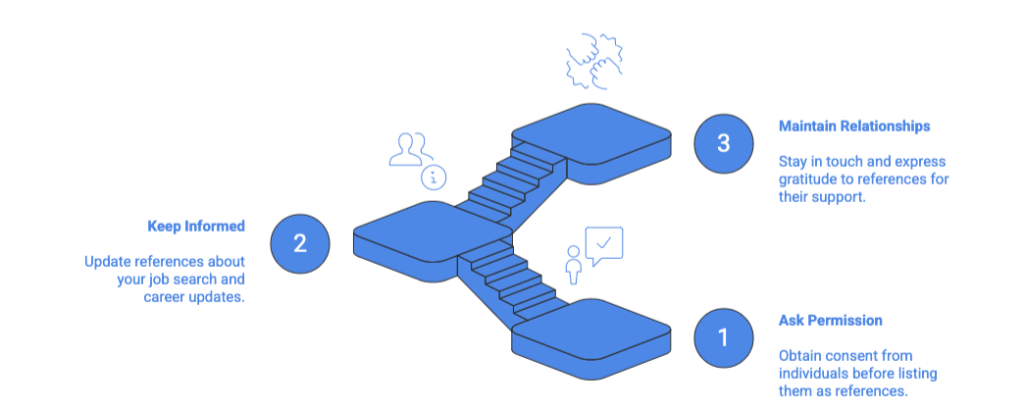
Always Ask Permission First
Never list someone as a reference without asking. This is non-negotiable professional courtesy.
How to request:
Sample request message:
“Hi [Name],
I’m currently exploring [type of role] opportunities and would be honored if you’d be willing to serve as a professional reference. I valued our time working together on [specific project/time period] and believe you can speak to my [relevant skills]. Would you be comfortable with this? If so, I’d like to share my updated resume with you and confirm your preferred contact information.”
Keep References Informed
When to update your references:
What to share:
Maintain Your Reference Relationships
Strong references come from maintained relationships, not just past connections.
Relationship maintenance:
When to refresh your reference list:
Quick Checklist: Resume References Done Right
Use this checklist to ensure your reference strategy supports your job search:
Resume Preparation:
Reference Sheet Creation:
Reference Selection:
Reference Management:
Application Strategy:
The bottom line: Your resume should demonstrate your value through achievements and skills. References validate that value later in the process. Keep them separate, keep them professional, and keep them ready to deploy when employers ask.