
How To Get Your Resume Noticed By Employers In 7 Seconds

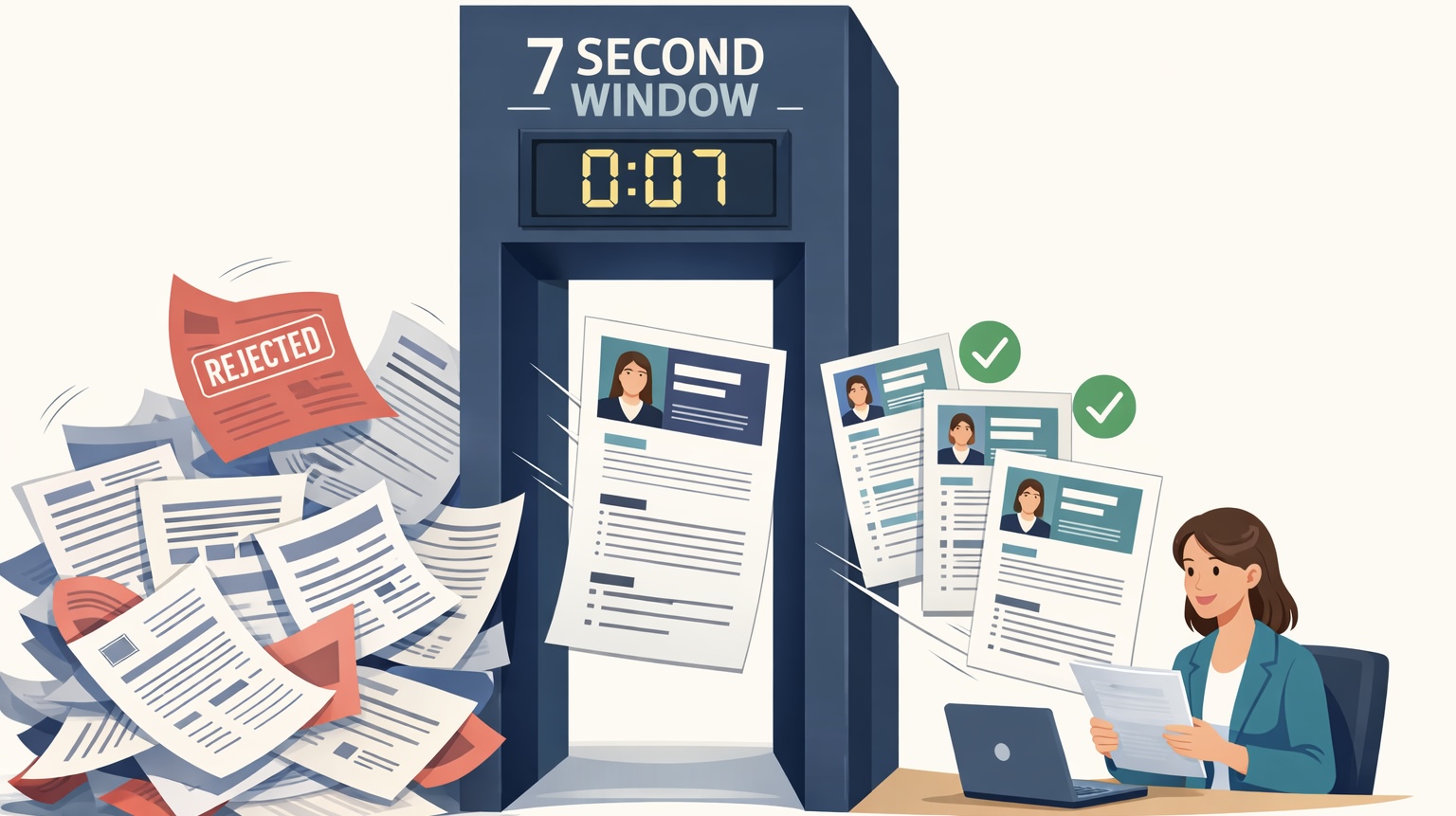
Illustration showing recruiter scanning resumes in 7 seconds, rejecting many and selecting a few optimized resumes.

TL;DR

  • To get your resume noticed by employers, start with the top third of it. For example. your job title, most recent role, and a summary that needs to make an immediate impression.
  • Keep your formatting clean and simple. Fancy designs, graphics, and unusual fonts can confuse ATS systems and make your resume harder to read.
  • Tailor your resume to each role. A generic resume that lists everything you have ever done is much less effective than one that is shaped around the job you are applying for.
  • Use clear language, strong action verbs, and numbers wherever you can. These small changes make a big difference in how your resume is read.

You have probably spent hours on your resume.

Picking the right words, getting the formatting just right, making sure everything is in order, and yet, the recruiter reading it will decide in about 7 seconds whether it is worth a closer look.

That is not a lot of time. But it is enough if your resume is set up the right way.

In this guide, we walk you through how to get your resume noticed by employers and what you can do to make sure your resume does not get passed over.


Step 01: Optimize the First Eye Glance

The first thing a recruiter does when they open your resume is not read it. They glance at it. In that split second, they are picking up on things like layout, structure, and whether it looks easy to read.

If your resume looks cluttered, hard to follow, or just visually overwhelming, most recruiters will move on before they have read a single word. First impressions are not just for interviews.

The good news is that this is one of the easiest things to fix. Here is what a good first glance looks like:

  • A layout with consistent fonts, standard resume section headers, and clear spacing between sections
  • A name and job title that stand out at the top
  • Text that is easy to read at a normal screen size
  • No graphics, photos, or design elements that pull a recruiter’s attention from the content

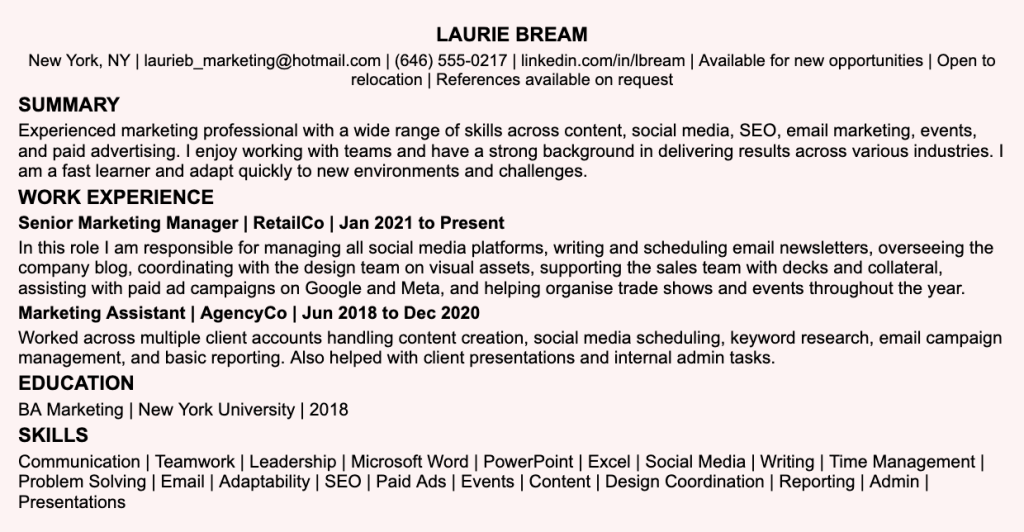
❌ Before – Hard to glance at

Example of a hard-to-scan resume for Laurie Bream, a marketing professional. Work experience is written in dense paragraph form instead of bullet points, making it difficult for recruiters to quickly identify key achievements. The skills section is an overly long, undifferentiated list mixing soft skills like Communication and Teamwork with technical ones like SEO and Paid Ads. The summary is generic and does not speak to a specific role.

✅ After – Clean and easy to scan at a glance
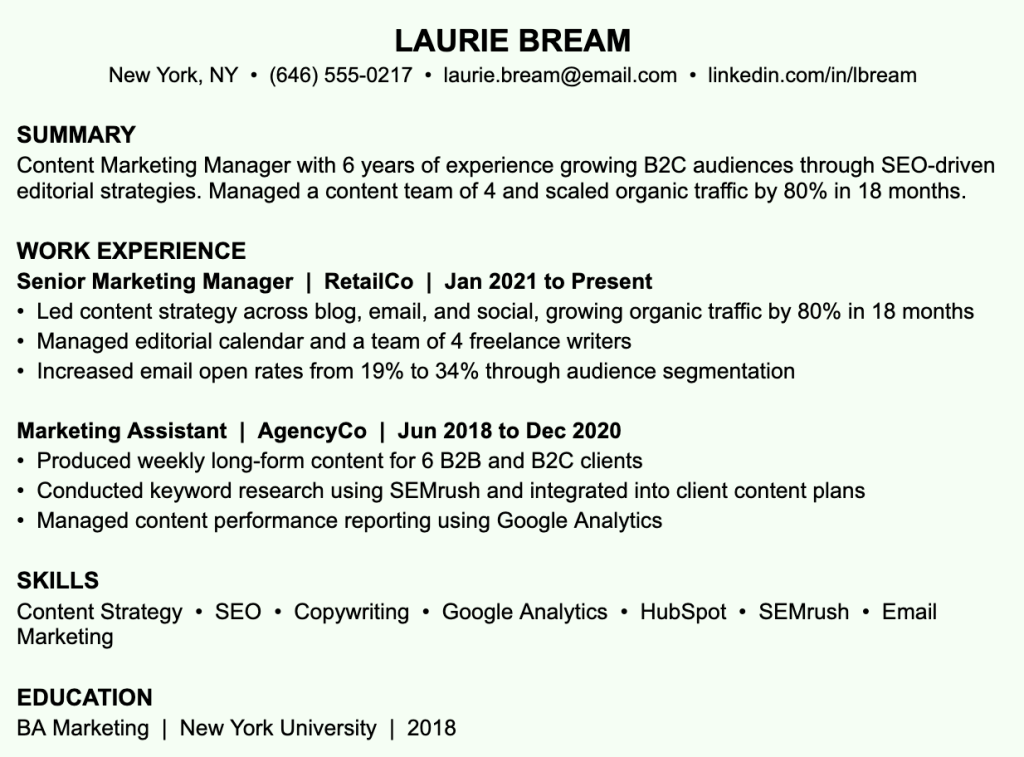
Example of a clean, easy-to-scan resume for Laurie Bream, a Senior Marketing Manager. Work experience is presented in concise bullet points with measurable results, such as growing organic traffic by 80% in 18 months and increasing email open rates from 19% to 34%. The summary is specific and role-focused, leading with a clear job title and quantified achievements. The skills section is short and limited to relevant technical skills like SEO, Google Analytics, HubSpot, and SEMrush. Consistent formatting, clear section headings, and adequate white space make the resume easy to read at a glance.

If your resume passes the glance test, the recruiter is much more likely to slow down and actually read it.

Resumes with heavy formatting, too much text, or unusual layouts often get skipped entirely, not because the experience is bad, but because they are too hard to scan.


Step 02: Prime the Top Third of Your Resume

Think of the top third of your resume as prime real estate. It is the first thing a recruiter sees before they scroll or flip the page. If it does not grab their attention, the rest of it does not matter.

For example. your job title, most recent role, and a summary that needs to make an immediate impression.

These three things together should give a recruiter a clear picture of who you are and what you bring to the table within a few seconds. In both examples below, Gavin is applying for a Senior Product Manager role at a B2B SaaS company.

❌ Before – Wrong order, wastes prime real estate
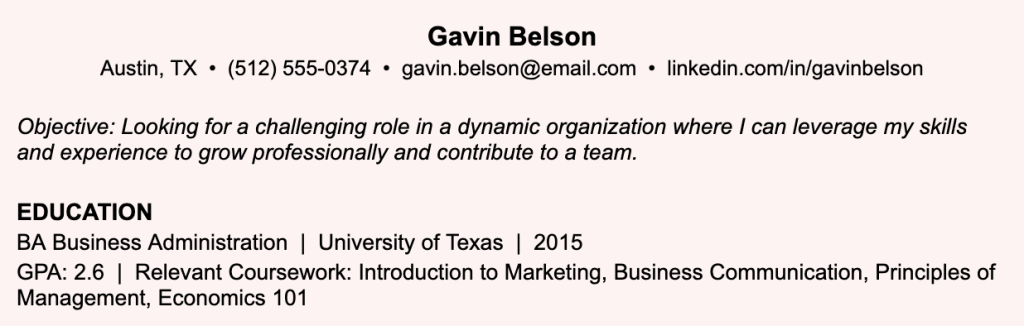
Example of a resume top section that wastes prime real estate. Gavin Belson's resume opens with a generic objective statement that says nothing specific about his value, followed immediately by an education section with a low GPA and coursework listed. There is no summary, no job title, and no relevant experience visible in the top section, giving the recruiter no reason to keep reading.

✅ After – Strong top third that earns a second look
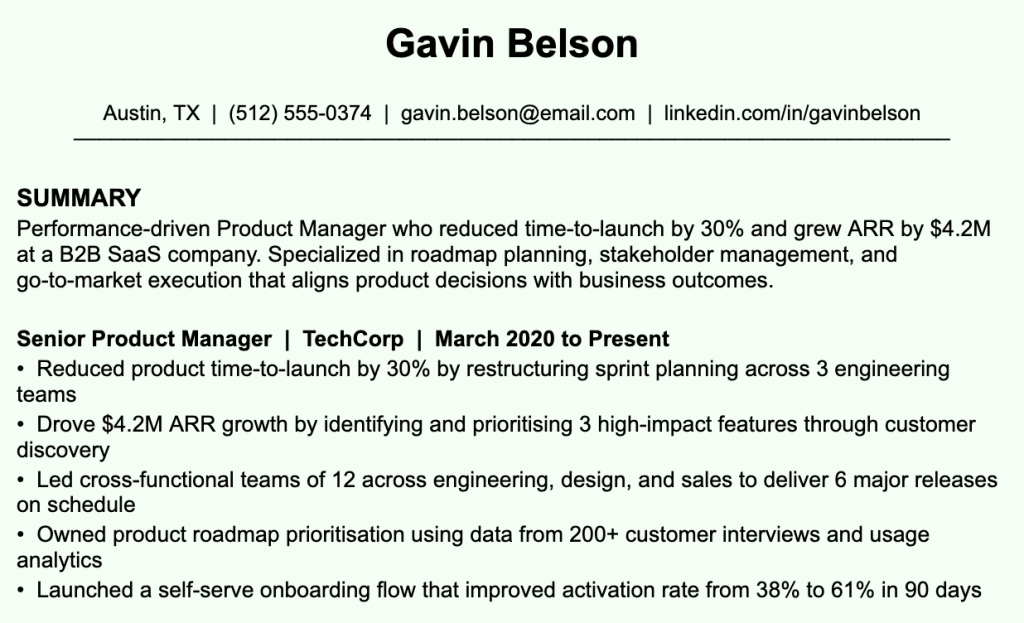
Example of a strong resume top section for Gavin Belson, a Senior Product Manager. The resume opens with a focused summary that leads with a clear job title and specific achievements, including reducing time-to-launch by 30% and growing ARR by $4.2M. Work experience follows immediately with bullet points that show measurable impact, such as improving activation rates from 38% to 61% and leading cross-functional teams across 3 engineering departments. The top section gives a recruiter a clear picture of who he is and what he delivers within seconds

This tells the recruiter exactly who Gavin is, what he is good at, and what he has achieved, all before they have even looked at the rest of the resume.

A lot of people fill the top third with an objective statement that says something generic like “looking for a challenging role in a dynamic organization.” This tells the recruiter nothing and wastes the most valuable space on your resume.


Step 03: Make the Pages Easy to Scan

Recruiters do not read resumes from top to bottom on the first pass. They scan for specific things, like your most recent job title, the company you work at, and whether your experience matches what they are looking for.

If your resume is a wall of text with no clear structure, those things are hard to find. And if a recruiter cannot find what they need quickly, they will move on.

Here is what makes a resume easy to scan:

  • Clear section headings like Work Experience, Education, and Skills with clear visual separation between sections. This helps recruiters jump straight to what they need without hunting through the page.
  • Short bullet points under each role rather than long paragraphs. Aim for one to two lines per bullet so each point is easy to absorb at a glance.
  • Consistent formatting throughout, same font, same spacing, and the same date format every time, so nothing looks out of place or rushed.
  • Enough white space so the page does not feel crowded. Margins and spacing between sections give the eye room to move and make the whole resume feel more readable.

❌ Before

Example of a poorly written work experience section. Responsibilities are listed in long paragraph form with vague language, mentioning tasks like handling social media, email campaigns, and content calendars without any specific results or numbers. The writing is informal and unfocused, making it difficult for a recruiter to quickly understand the candidate's actual impact or expertise.

✅ After

Example of a well-written work experience section for a Senior Marketing Manager at BrandCo. Each responsibility is listed as a concise bullet point with a clear result attached, such as managing email campaigns reaching 200K+ subscribers, growing organic blog traffic by 60% in 12 months, and producing sales collateral that contributed to a 15% increase in conversion rate. Strong action verbs and specific numbers make the impact immediately clear

Resumes that use long paragraphs instead of bullet points, or cram everything onto one page without any breathing room, are much harder to scan. Even a strong professional experience can get overlooked if it is buried in a wall of text.


Step 04: Use a Simple and ATS-Friendly Resume Design

A lot of people think a creative or visually impressive resume will help them stand out. In most cases, it does the opposite.

Most companies use ATS software to screen resumes before a human sees them. These systems are designed to read text in a specific way.

When you use tables, headers, footers, text boxes, graphics, or unusual fonts, the ATS can misread or completely miss important information. Your resume might get filtered out before anyone has even looked at it.

As far as resumes go, simple is better. Here is what an ATS-friendly resume looks like:

  • Single column layout. Multi-column resume formats can confuse ATS systems and cause them to read your information out of order.
  • Standard fonts like Arial or Calibri in 10 to 12pt. Decorative or uncommon fonts can be misread by ATS systems and are harder on the eye for recruiters.
  • No tables, text boxes, graphics, or icons. These elements often get stripped out or scrambled when an ATS parses your resume.
  • Clear section headings that ATS systems can recognize, like Work Experience, Education, and Skills. Avoid creative alternatives like “My Journey” or “What I Bring.”
  • Saved as a .docx or PDF file. Other formats, like image files or page documents, are not reliably compatible with most ATS systems.

❌ Before – Not ATS-friendly: profile photo + table layout
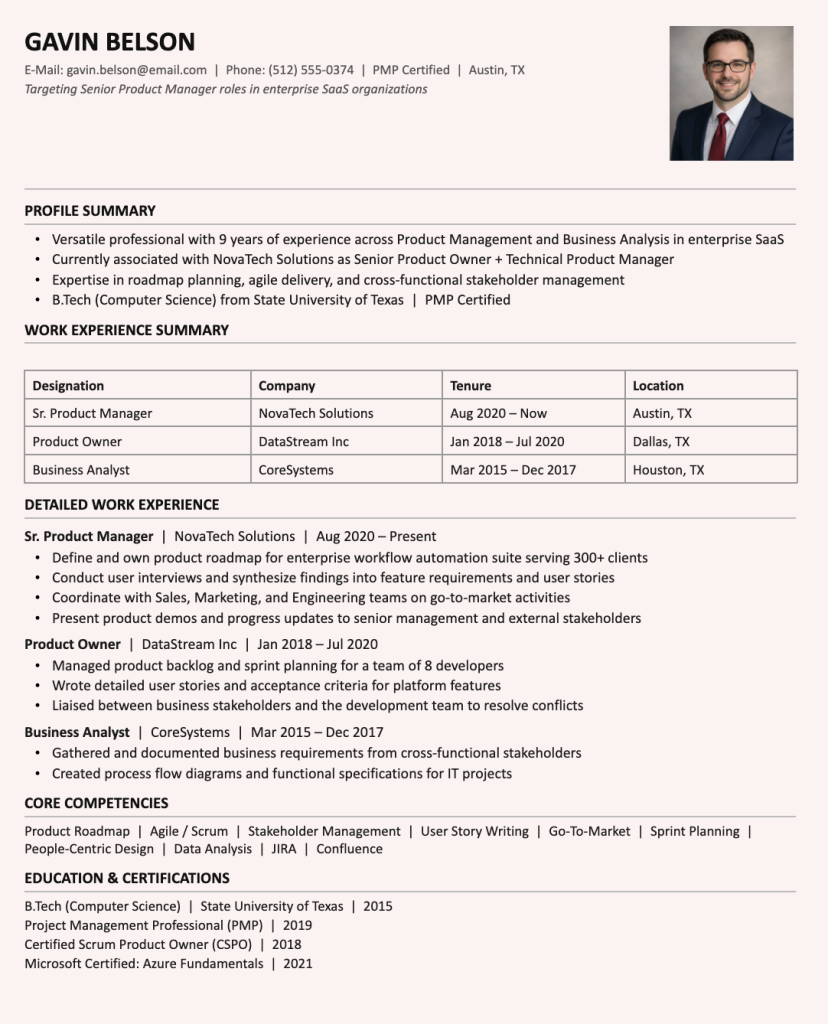
Example of a resume that is not ATS-friendly. Gavin Belson's resume includes a profile photo in the top right corner and uses a table to summarize work experience, both of which can confuse ATS systems and cause key information like job titles, company names, and dates to be misread or skipped entirely. The section heading says 'Work Experience Summary' instead of a standard 'Work Experience' label, which ATS systems may not recognize. The overall layout, while visually organized to a human eye, is likely to get filtered out before any recruiter sees it

A resume that looks like this might seem organized to the human eye, but an ATS cannot read tables and may not process the photo correctly. The result is that job titles, companies, and dates inside the table get scrambled or missed entirely, and your application gets filtered out before any recruiter sees it.

For a full example of what an ATS-friendly resume looks like in practice, see the complete resume example in the next step.


Step 05: Profile for the Role Instead of Listing Everything

One of the most common resume mistakes is treating your resume like a complete record of everything you have ever done. It is not.

Your resume is a marketing document, and it should be shaped around the specific role you are applying for.

When a recruiter opens your resume, they are looking for evidence that you can do the job you are applying for. If your resume is a long list of every responsibility you have ever had, they have to do a lot of work to figure out if you are a good fit. Most will not bother.

So, that’s why you must tailor your resume for every job you apply for.

Tailoring your resume does not mean rewriting it from scratch every time. Here is what it actually involves:

  • Adjust your summary so it speaks directly to the role you are applying for. A one-size-fits-all summary rarely resonates with recruiters who are looking for a specific fit.
  • Highlight the most relevant experience by bringing it higher up in your bullet points. If it is buried at the bottom, recruiters may never get to it.
  • Make sure the skills you lead with match what the job description is asking for. If the role prioritizes certain tools or competencies, those should be front and center on your resume.
  • Mirroring the language used in the job description. If they say “stakeholder management,” use that exact phrase rather than a loose equivalent.

A generic resume that lists everything equally sends the message that you do not have the right experience for the role.

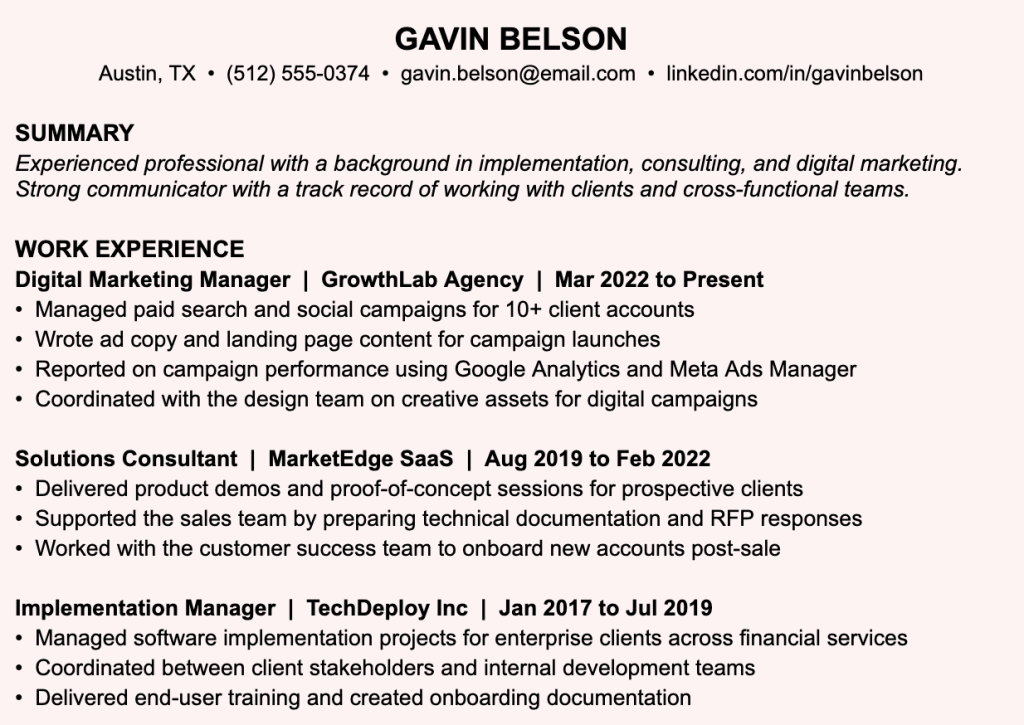
Below is the example of a generic vs. a tailored resume. Both candidates are applying for the same role: Director of Product Marketing at a B2B SaaS company.

❌ Before – Gavin Belson: mismatched experience, not tailored for the role
Here are the alt texts for both:

Red (Before):
"Example of a resume that is not tailored for the role. Gavin Belson's work history jumps between digital marketing, solutions consulting, and software implementation, with no clear connection to product marketing. The summary is generic and does not mention the role he is targeting. None of the bullet points speak to product marketing skills like positioning, go-to-market strategy, or product launches, making it hard for a recruiter to see why he is applying for a Director of Product Marketing role.

✅ After – Laurie Bream: clear progression toward Director of Product Marketing
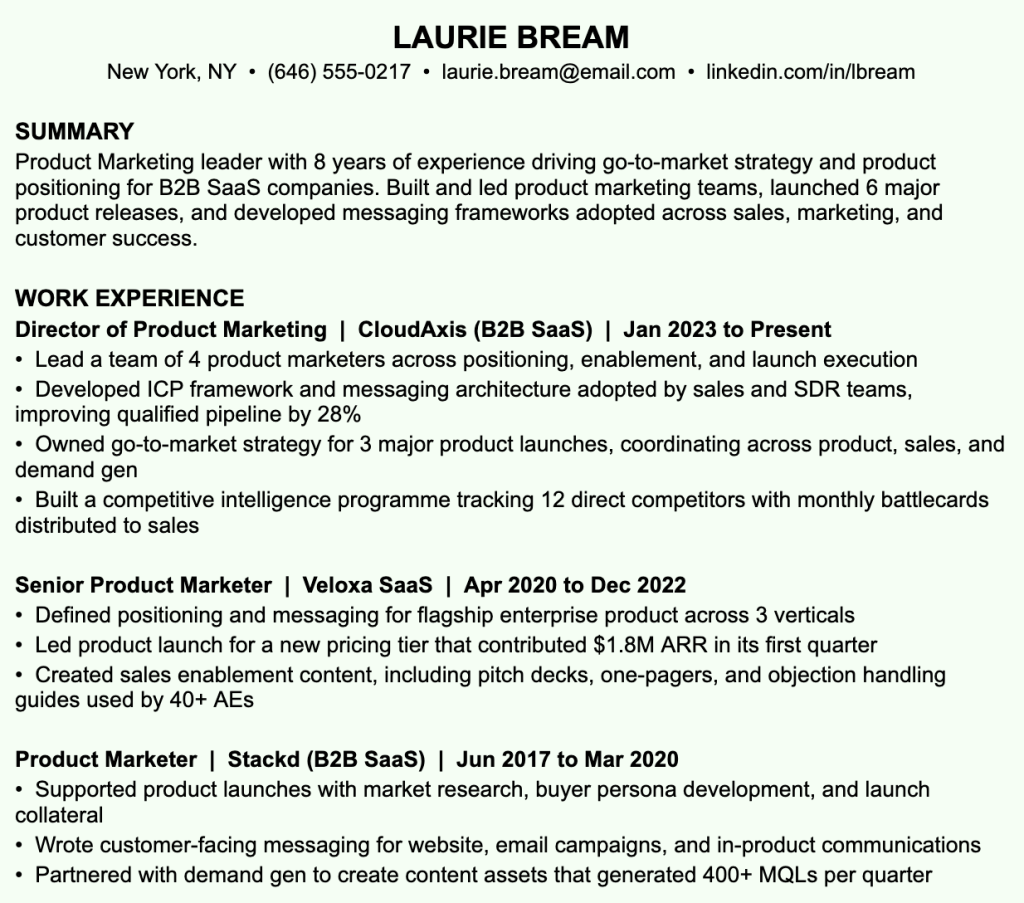
Example of a resume clearly tailored for a Director of Product Marketing role. Laurie Bream's summary leads with her specific expertise in go-to-market strategy and product positioning for B2B SaaS companies. Every role in her work history connects directly to product marketing, with bullet points showing measurable impact such as improving qualified pipeline by 28%, contributing $1.8M ARR through a product launch, and generating 400+ MQLs per quarter. The career progression from Product Marketer to Director is immediately clear to any recruiter.

Why Laurie’s resume works and Gavin’s doesn’t

Gavin’s background jumps between digital marketing, consulting, and implementation. None of it maps clearly to product marketing. Laurie’s resume, on the other hand, makes the fit obvious from the first line. Every role and every bullet point connect directly to what the job requires.


Step 06: Use Common Industry Terminology

Every industry has its own terminology. The words and phrases that recruiters and ATS systems look for are usually right there in the job description.

If your resume does not use that language, it can look like you are not familiar with the field.

This does not mean that you should stuff your resume with industry jargon. It means using the same terminology that the industry uses so that your experience is immediately recognizable.

❌ Before

Example of a Product Manager resume that uses vague, informal language instead of industry terminology. Bullet points describe tasks in plain conversational language, such as making sure projects were delivered on time and keeping track of how the product was doing using numbers. None of the standard product management terms like stakeholder management, product roadmap, or KPIs are used, making the experience harder for both ATS systems and recruiters to recognize as relevant.

✅ After

Example of a Product Manager resume that uses clear industry terminology. The same responsibilities are rewritten using recognized product management language, including stakeholder management, product roadmap prioritization, customer discovery, and KPIs like activation rate, retention, and NPS. The bullet points are specific and professional, making it immediately clear to both ATS systems and recruiters that the candidate is familiar with the field.

Using vague or informal language where specific industry terms are expected can make your resume look less credible. It can also cause ATS systems to miss your relevant experience entirely because the keywords do not match.


Step 07: Show Results Instead of Responsibilities

Most resumes just list what you were supposed to do in a role. But honestly, that is true for everyone who has held that position. What recruiters actually want to know is what you did with it.

❌ Before

Example of a Social Media Manager resume with weak bullet points that only list responsibilities. Phrases like responsible for managing social media accounts and worked on the company's email newsletter describe the job in generic terms with no results or numbers attached. Any candidate in the same role could say the same things, giving the recruiter no reason to pick this resume over others."

✅ After

Example of a Social Media Manager resume with strong, results-driven bullet points. Each responsibility is paired with a specific outcome, such as growing Instagram following from 5K to 22K in 8 months, increasing LinkedIn engagement by 45%, and boosting email open rates from 18% to 31%. The numbers give recruiters something concrete to hold onto and clearly show the impact the candidate had in the role

The second one tells the recruiter exactly what you did and what came out of it.

A simple way to check if your bullet point is strong enough is to ask: does it say what I did AND what came out of it? If it only answers one of those, it needs a number or an outcome added to it.

This matters because recruiters go through dozens of resumes that all say the same things. But when your bullet points include real numbers and outcomes, they give the recruiter something concrete to hold onto.

It also signals that you were not just showing up, you were paying attention to the impact of your work. Resumes without results do not just look generic; they leave the recruiter with no reason to pick you over someone else.


Step 08: Use Strong Action Verbs

The first word of each bullet point matters because recruiters usually scan resumes very quickly. When they look through a list of bullet points, their eyes tend to catch the first word before anything else. That word immediately signals what role you played in the work being described. When a bullet point starts with a strong action verb, it suggests that you were directly responsible for the work.

Words like “helped,” “assisted,” or “worked on” make your contribution sound passive and hard to define. Recruiters prefer to see clear ownership, and weak openers can undersell even impressive experience.

Here are some examples of weak verbs and stronger alternatives:

  • Helped → Led, Drove, Delivered
  • Worked on → Developed, Built, Executed
  • Was responsible for → Managed, Oversaw, Directed
  • Assisted with → Supported, Contributed, Coordinated

❌ Before

Example of an Engineering Lead resume with weak action verbs that undersell the candidate's experience. Bullet points start with passive words like helped, worked on, and assisted, making contributions sound vague and secondary. There are no numbers or outcomes, so a recruiter has no way of knowing the scale or impact of the work done.

✅ After

Example of an Engineering Lead resume with strong action verbs and measurable results. Each bullet point starts with a confident verb like Led, Rebuilt, and Designed, and includes a specific outcome such as reducing hosting costs by 35%, cutting release time from 4 hours to 45 minutes, and onboarding 6 new engineers across 2 product teams. The rewrites show clear ownership and make the candidate's impact immediately obvious.

Strong action verbs also make your resume easier to scan. Words like “Led,” “Built,” or “Automated” immediately tell a recruiter that you took initiative and delivered something meaningful.


Step 09: Explain Employment Gaps or Short Roles

Employment gaps and short stints at companies are not the deal breakers they used to be. Most recruiters understand that careers are not always straightforward. What they do not like is being left to guess.

If you have a longer than 6-month gap in your work history, a brief note explaining it goes a long way. The same goes for short roles. If you leave after 6 months, a one-line explanation in your cover letter or even in the role description itself can prevent unnecessary questions.

❌ Before – Unexplained gap in work experience
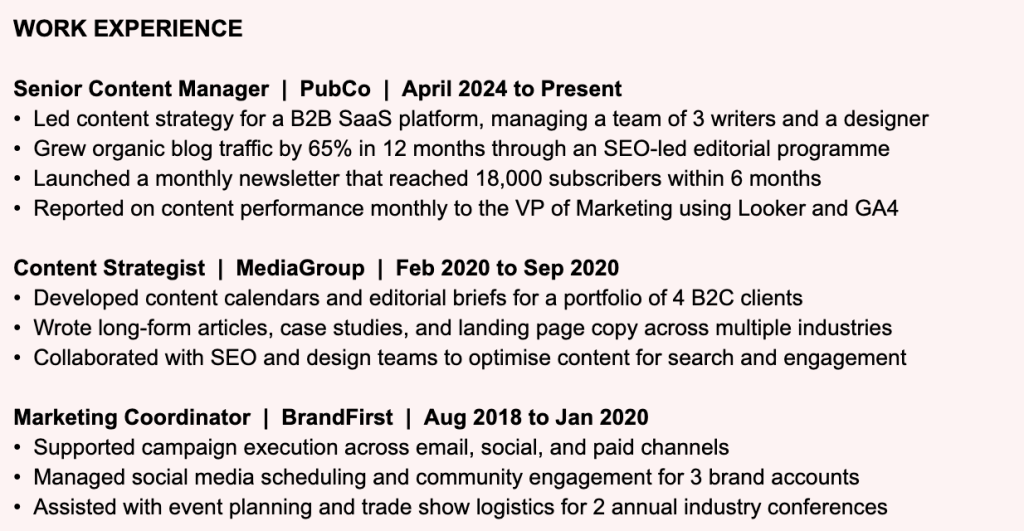
Example of a resume with an unexplained employment gap. The work history jumps from a Content Strategist role ending in September 2020 directly to a Senior Content Manager role starting in April 2024, leaving over 3 years completely unaccounted for. There is no note or explanation anywhere in the section, which is likely to raise questions in a recruiter's mind and create doubt about the application.

✅ After – Gap explained clearly within the work experience section
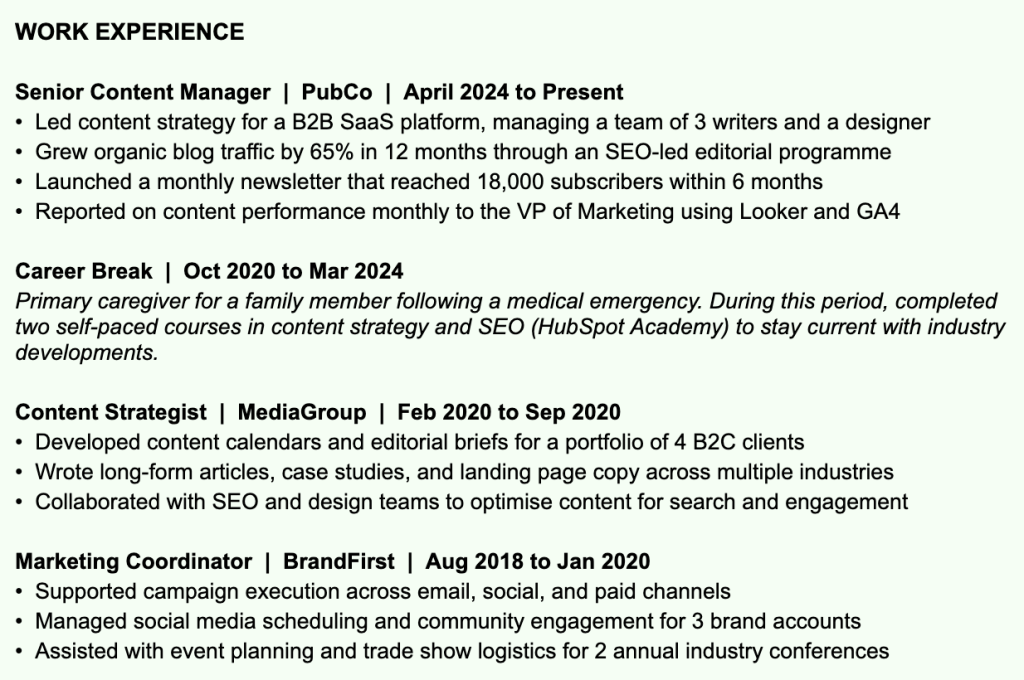
Example of a resume where an employment gap is addressed directly within the work experience section. A Career Break entry is added between October 2020 and March 2024 with a brief explanation stating the candidate was a primary caregiver following a family medical emergency, and also completed two self-paced courses in content strategy and SEO during that time. This removes any ambiguity and shows the recruiter exactly what happened, without leaving them to guess.

Leaving gaps unexplained or trying to hide short stints by removing dates can raise more questions than it answers. Recruiters notice these things, and it can create doubt about your application even before the interview stage.


Step 10: List a Balanced Skill Set

Your skills section should be a focused list of the hard skills most relevant to the role you are applying for. It should not be a long list of everything you have ever learned, and it should not be full of soft skills like “good communicator” or “team player.”

Soft skills are best shown through your achievements in the work experience section. In the skills section, stick to technical and role-specific skills that are either mentioned in the job description or directly relevant to the work.

❌ Before

Example of a poorly structured skills section that mixes soft skills and basic tools together in one long undifferentiated list. Skills like Positive Attitude, Fast Learner, and Adaptability add no value to a skills section and take up space that could be used for role-specific technical skills. ATS systems scanning for relevant keywords will find very little here, and recruiters will not get a clear picture of what the candidate actually knows how to do.

✅ After

Example of a focused, well-organized skills section grouped by category. Product skills like Roadmap Planning, A/B Testing, and Sprint Planning are listed separately from Data and Analytics tools like SQL, Mixpanel, and Looker, and from productivity tools like Jira, Figma, and Notion. The section is concise, easy to scan, and contains only technical and role-specific skills that are directly relevant to a product role.

Aim for 5 to 10 skills that are genuinely relevant. Grouping them by category can also make this section easier to read.

A skills section full of soft skills or irrelevant tools can make your resume look padded. It also takes up space that could be used for something more useful, and ATS systems are looking for specific technical keywords, not generic traits.


Step 11: Bridge the Title Gap

Sometimes the job title you are applying for does not exactly match the title you currently hold or have held before. This can be a problem because ATS systems and recruiters both look for familiar titles.

If your current job title is very different from the job you’re applying for, your resume might not get discovered even if your responsibilities and experience are a strong match.

Now, there are two simple ways to bridge this gap without misrepresenting yourself.

  • You can add a line in your summary that mentions the title you are targeting.

For example:

Example of how to bridge a job title gap in the resume summary. The summary opens with the target job title directly, reading: Content Marketing Manager with 5 years of experience leading editorial strategy and content teams. This helps ATS systems and recruiters match the candidate to the role even if their official job title is different.
  • You can use a slightly adjusted version of your title in brackets next to your official one.

For example:

Example of how to bridge a job title gap in the work experience section. The official job title Content Lead is listed first, followed by the more recognizable equivalent Content Marketing Manager in brackets next to it, so the entry reads: Content Lead (Content Marketing Manager) | XYZ Company | 2020 to 2023. This makes the candidate's experience easier for ATS systems to pick up without misrepresenting their actual title.

Step 12: Learn and Iterate

If you have been sending out your resume for a while and not hearing back, it is worth asking yourself if it is working. People put a lot of effort into their resumes and then feel reluctant to change them, even when they are not getting results.

The truth is, no resume is perfect for every role or every recruiter. If your current format is not working, trying something different doesn’t mean you’re giving up. By changing the resume format, you’re just being smart about your approach.

Here are a few things worth trying if your resume is not getting noticed:

  • Change Your Resume Format: If you haven’t heard from recruiters for a long time, try switching up your resume format. You can try using a reverse chronological resume instead of a functional one, or vice versa.
  • Simplify Your Design: If your resume is currently heavy on formatting or visuals, strip it back to a clean single-column layout with standard fonts. A simpler design is easier to read and more likely to pass through ATS systems.
  • Rewrite Your Summary: If your current summary is generic, rewrite it to speak directly to the roles you are targeting. A specific and focused summary is far more likely to grab a recruiter’s attention than a broad one.
  • Get a Second Opinion: Ask someone else to read your resume and tell you what stands out and what does not. A fresh set of eyes often catches things you have become too familiar with to notice.

Sticking with a resume that is not working because you have invested time in it means continuing to miss out on opportunities. Small changes can sometimes make a big difference in how your resume lands.


Get Your Resume Noticed Using Upplai

You can follow every tip in this guide and still not know whether your resume is actually getting noticed by the recruiters. Now, what if you had a virtual recruiter tell you how to improve your resume and why?

Upplai is that guide.

With Upplai, getting noticed by the recruiter is simple. You upload your resume and paste the link to the job description. Upplai will calculate the ATS score of your current resume and tailor it based on the job.

Also, it will suggest changes and explain to you why you should make them. As you edit your resume, it scores it against the job description in real time. You do not have to download it, make changes somewhere else, and re-upload to check. You see exactly where you stand as you go, which saves a lot of time and a lot of guesswork.

But here’s what makes Upplai different from other resume builder tools:

  • No hidden paywalls: Most resume builders advertise free and then ask for a credit card the moment you try to do anything useful. Upplai gives you 200 monthly ATS scans, 3 tailored resumes, and unlimited downloads for free. No credit card. No catch.
  • Transparent suggestions: Other AI resume builders make changes without telling you what they altered or why. Upplai highlights every suggestion and explains the reasoning behind it. You stay in control and can accept or reject any change with one click.
  • More than just rewrites: most tools only touch your bullet points. Upplai also guides you on structure, like when to use a summary vs. an objective, what sections to cut, what content to prioritize, how to order everything based on your background, and even flags for potential recruiter bias.
  • Your resume history, organized: Upplai stores the exact resume and job description you submitted for each role, so you are never scrambling to remember what version you sent when an interview comes up weeks later.

Frequently Asked Questions

The best keywords to include for job application success are the ones directly from the job description. Look for specific skills, tools, job titles, and phrases that appear in the posting and mirror those keywords in your resume. ATS systems match keywords, so using the exact terms the employer uses gives you the best chance of getting through.

Recruiters prefer simple and clean reverse chronological resume templates with a single-column layout, standard fonts, and clear section headings. Resume templates that are heavy on design elements like graphics, icons, or columns may look good, but perform poorly with ATS.

To make your resume stand out, use an online resume builder, paste the job description into the tool so it can tailor your resume to that specific role. Use the ATS scoring feature to see how well your resume matches and adjust based on the suggestions. Review every recommended change before accepting it to make sure what you submit is still accurate and true to your experience.

Upplai is the best online resume builder with AI features because it goes beyond just reformatting your resume. It stands out because it automatically tailors your resume to the job description, highlights every change with an explanation, and lets you accept or reject each one.

Yes, you should tailor your resume for each role you apply to. You do not need to rewrite it from scratch every time, but adjusting your summary, reordering your bullet points, and matching the language in the job description can make a big difference in how your resume is received.

Your resume should be under one page if you have less than10 years of experience. Two pages is fine for more senior candidates. Anything longer than two pages is rarely necessary and can work against you.

Yes, the file format of your resume matters. PDF and .docx files generally have the best compatibility with ATS systems. PDF has a slight advantage because your resume formatting stays intact across platforms. Avoid sending your resume as an image file or in any format that is not standard.

You should update your resume every time you finish a project, get a promotion, or learn a new skill. Waiting until you need it means you will likely forget important achievements and have to scramble to remember details.

Ready to get 6X more interviews?

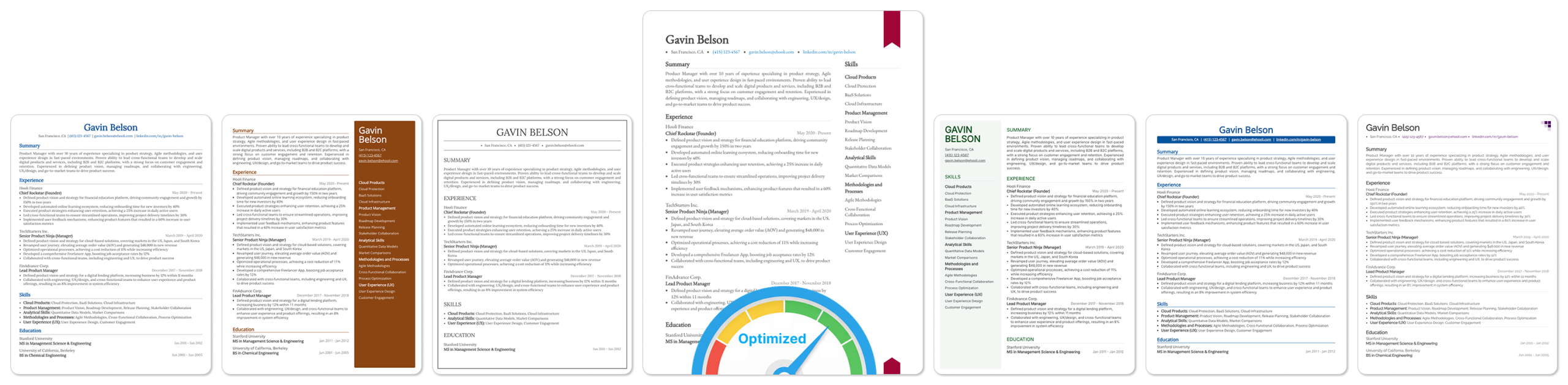
Image showing multiple resumes, with the selected one optimized for ATS