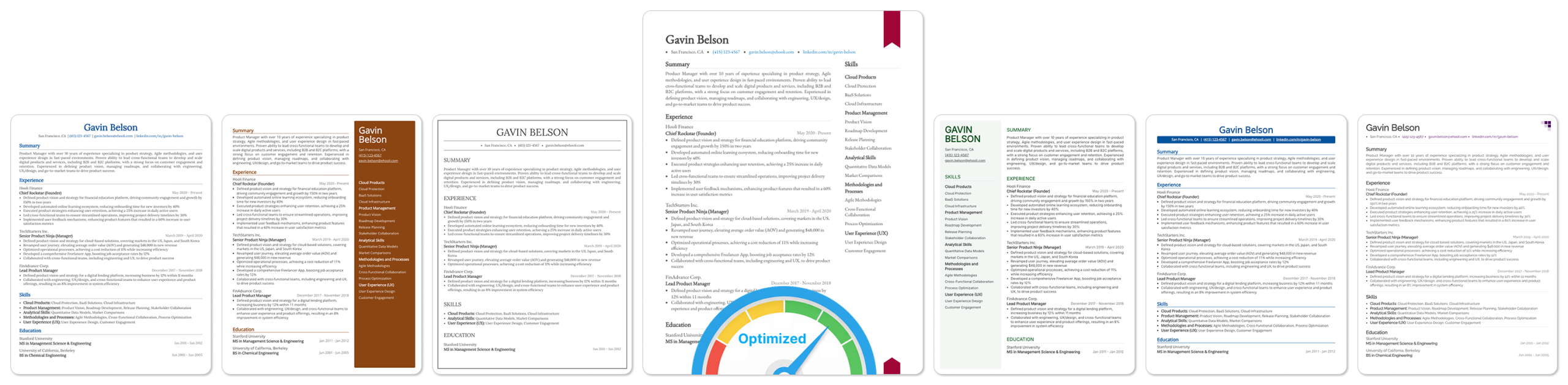


TL;DR
Getting your resume right is already hard. And when you finally turn to ChatGPT for help, you either get something that sounds nothing like you or advice so generic it could apply to anyone.
The problem is not ChatGPT itself. It is how most people use it. In this guide, we show you how to use ChatGPT to review your resume, so you actually get something useful out of it.
Step 0: Prepare Your Resume First
Before you even open ChatGPT, you need to have a draft ready. This is non-negotiable.
Here’s why: ChatGPT is a language model. It’s very good at refining, restructuring, and improving text. But it has no idea what you actually did at your last job.
For example, it doesn’t know that you led a migration to AWS, managed a team of five, or reduced customer churn by 18%. Only you know that.
If you skip this step and ask AI to “write your resume,” what you’ll get is a generic, hollow document full of filler phrases that hiring managers can spot from a mile away.
Your resume has to come from you first.
So open a Google Doc, grab a Word template, or use a free resume builder like Teal or Upplai. Just get your experience down in a rough structure:
Don’t stress about making it perfect at this stage. You’re not writing a final draft; you’re giving the AI something real to work with.
Step 1: Give ChatGPT a Role
Before you share your resume with ChatGPT and start asking questions, there’s one small but important thing you need to do first: tell ChatGPT who it is.
This might sound a little odd, but it makes a real difference in the quality of responses you get. ChatGPT is a general-purpose tool. By default, it’ll give you general-purpose answers.
But when you assign it a specific role, it shifts its tone, vocabulary, and focus to match that context. You’re essentially narrowing its lens.
Here’s the kind of prompt you want to start with:
“You are an expert resume writer with 20 years of experience helping software engineers land roles at top tech companies. Your job is to help me improve my resume, not rewrite my experience, but sharpen how it’s presented.“
Notice a few things about that prompt:
You can also layer in more details depending on your situation. For example:
“I am a mid-level data analyst with 4 years of experience, trying to move into a senior analyst role at a fintech company. Help me position my resume for that transition.“
The more context you give upfront, the less back-and-forth you’ll need later. Think of it like briefing a colleague before a meeting. The better the briefing, the more useful the output.
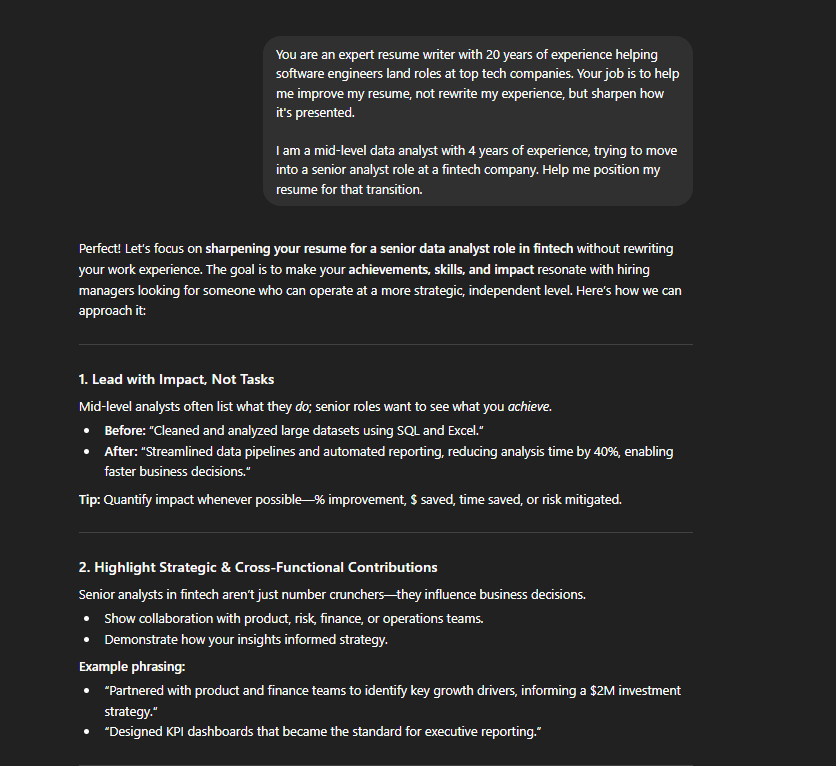
One thing to remember: this role-setting prompt is just your opening message. You haven’t shared your resume yet. You’re just setting the stage. Once ChatGPT acknowledges the role, you start sharing in your resume and working through it section by section.
Step 2: Turn Your Bullet Points Into Evidence
Your resume bullet points are the most important part of your resume. They are also the part most people get wrong.
Most resume bullets fail in one of three ways: they describe a task instead of an accomplishment, they describe an accomplishment without a clear result, or they have a result but leave it vague.
Your goal in this step is to fix all three, and ChatGPT is going to help you do it systematically.
Think of it as a progression every bullet point needs to go through:
Task → Accomplishment → Result → Number
Here’s what that looks like in practice: “Managed social media accounts” is a task. Everyone in that role managed social media. It tells the hiring manager nothing about you specifically.
“Shifted content strategy to short-form video, growing Instagram following from 4,000 to 22,000 in 8 months” is an accomplishment with a result and a number. That’s a bullet worth keeping.
Use these three prompts in sequence after pasting your resume into ChatGPT:
Prompt 1 — Tasks to Accomplishments:
“Which of my bullet points are tasks rather than accomplishments? For each one, ask me questions to help convert them.“
Prompt 2 — Accomplishments to Results:
“Which bullets don’t show a clear result or outcome? For each one, ask me what changed because of my work — what was better, faster, cheaper, or more reliable after I did this?“
Prompt 3 — Results to Numbers:
“Which results can be quantified? Ask me questions to pull out specific figures — time saved, revenue generated, cost reductions, team size, volume handled, percentage improvements.“
Each prompt builds on the previous one. By the end, your bullets should read less like a job description and more like a case for why you should be hired.
A few things to keep in mind as you go through this: You won’t always have hard numbers, and that’s okay. A clear directional result, for example, “reduced onboarding time” or “eliminated a manual process,” is still better than nothing. But push yourself to quantify wherever you honestly can. Aim for at least 60% of your bullets to include a measurable result.
And one firm rule: never let ChatGPT invent an outcome for you. Its job here is to help you surface and phrase what’s already true.
Step 3: Highlight Relevant Projects
Depending on where you are in your career, your projects section can actually be one of the most valuable parts of your resume.
This is especially true in two situations:
In both cases, the ‘projects’ section gives you space to show relevant work that your job history can’t.
Here’s the problem: most people describe their projects the same way they describe their tasks at work. They write what the project was, not what it did.
For example: “Built a personal finance tracking app using React and Node.js.“
That tells the reader what tech stack you used. It doesn’t tell them anything about the impact, the problem it solved, or the scale of it.
A better version: “Built a personal finance tracking app from scratch using React and Node.js. Used by 200+ users, with features for expense categorization, monthly budget alerts, and CSV export.“
Same project. But now the reader understands the scope, the functionality, and that real people actually used it.
Use this prompt in ChatGPT after sharing your project descriptions:
“Here are my project descriptions. Help me rewrite each one to clearly explain the problem it solved, the approach I took, and the outcome or impact. Ask me questions if you need more details.“
ChatGPT will ask things like: “Who was this project built for?” or “Did anyone use this — and if so, how many people?” or “What problem were you solving?”
Answer those questions honestly and let it help you shape the description.
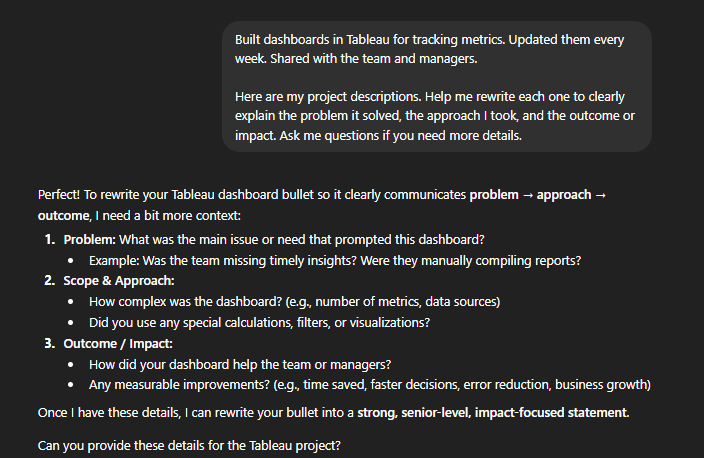
If you don’t have a projects section yet, but you’re in a situation where you need one, this is also a good moment to think about building one. A focused side project that’s directly relevant to the job you’re applying for can carry a lot of weight.
ChatGPT can even help you brainstorm project ideas based on your target role:
“I’m applying for junior UX designer roles, but my background is in graphic design. What kind of portfolio projects would be most relevant to include on my resume?“
You’d be surprised how useful that conversation can be.
Step 4: Craft a Strong Professional Summary
Your resume summary is the first thing a hiring manager reads. In most cases, it’s also what decides whether they keep reading or move on. Yet most people either skip it entirely or fill it with something so generic it might as well not be there.
“Motivated and results-driven professional seeking a challenging role where I can leverage my skills to contribute to organizational growth.“
That sentence says nothing. Every word in it could apply to any person applying for any job. If your summary sounds like that right now, this step is going to make a significant difference.
First, let’s figure out which one you actually need: a summary or a resume objective. They’re not the same thing.
Use an objective if you’re a fresh graduate or have less than two years of experience. An objective tells the hiring manager what you’re aiming for and what you bring to the table, even if your experience is limited.
Example: “Recent computer science graduate with hands-on experience in Python and machine learning through academic and personal projects. Looking to join a data-focused team where I can build production-ready models and grow into a senior data scientist role.“
Use a professional summary if you have more than two years of experience. A summary captures who you are professionally, what you’re best at, and where you’re headed.
Example: “Product manager with 6 years of experience leading cross-functional teams in fintech. Shipped three consumer-facing products from zero to launch, with a combined user base of 400,000+. Now focused on senior roles where I can own end-to-end product strategy.“
Notice that both examples are specific, concise, and tell a story. Two to three sentences is all you need.
Here’s how to use ChatGPT for this:
“Based on my resume, write three versions of a professional summary for me, each with a slightly different angle. Keep each one to 2-3 sentences. Focus on my strongest achievements and the role I’m targeting.“
You’re asking for three versions on purpose. This gives you options to mix and match rather than trying to tweak a single output. Take the parts that feel most accurate and most like your voice, and combine them.
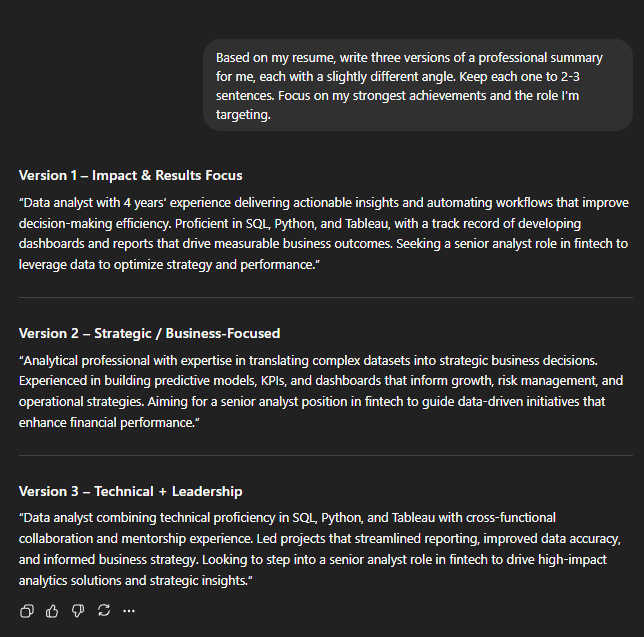
A few things to check once you have a draft:
Step 5: Tailor Your Resume for ATS
ATS stands for Applicant Tracking System. It’s software that most mid-to-large companies use to rank and filter resumes before a human ever sees them. It scans your resume for specific keywords, usually pulled straight from the job description, and ranks or filters candidates based on how well their resume matches.
If your resume doesn’t contain enough of the right keywords, it gets filtered out automatically.
This is why you can be genuinely qualified for a job and still get no response. It’s not always a human making that call. So, before you submit your job application, your resume needs to be optimized for ATS.
Here’s how to use ChatGPT to fix this:
1. Paste the full job description into ChatGPT and use this prompt:
“Here is a job description. Pull out the most important keywords and phrases, such as skills, tools, qualifications, and responsibilities that I should make sure appear in my resume.“
ChatGPT will give you a list. It might look something like: project management, stakeholder communication, Agile, cross-functional teams, KPI tracking, roadmap planning, whatever is specific to that role.
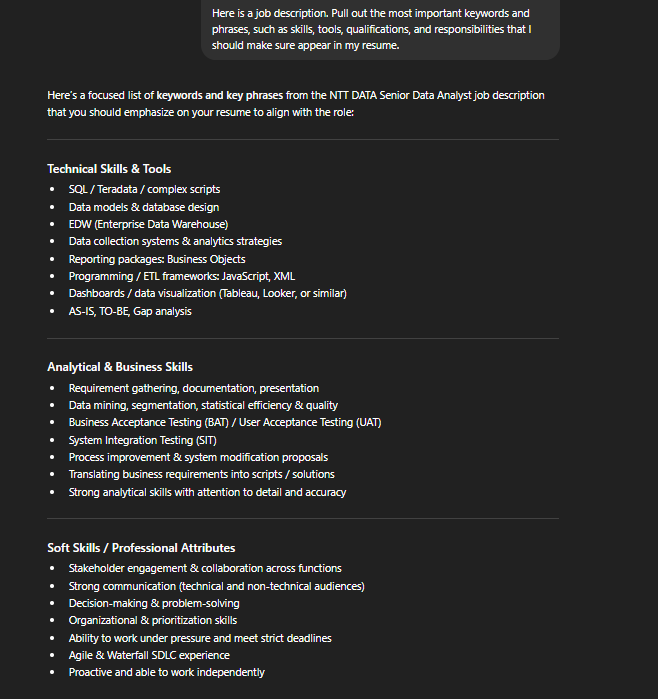
Once you have the list, use this prompt :
“Which of those keywords are missing or underrepresented in my resume? Where can I naturally incorporate them without forcing them in?“
“Naturally” is the keyword here. ATS systems have gotten smarter, and keyword stuffing can actually work against you. More importantly, when your resume beats the ATS, a human will eventually read your resume. And a resume that reads like a keyword list is a red flag.
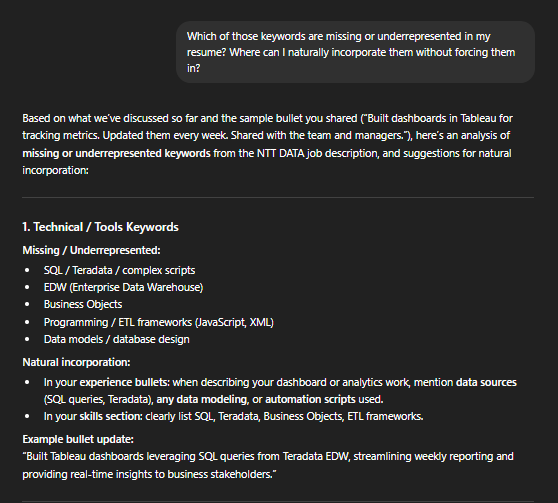
2. Remember to mirror the language from the job description. Different companies use different terminology for the same thing. One company says “revenue growth,” another says “top-line growth.” One says “software engineer,” another says “software developer.” ATS systems are often literal; they match exact terms.
Use this prompt:
“Are there any places in my resume where I’m describing something accurately but using different terminology than the job description? Suggest where I should align my language.”
A few things to keep in mind:
Pro Tip: ChatGPT is a solid starting point for resume keyword research, but it can’t actually simulate how an ATS scores your resume. It’s actually guessing based on the job description.
ChatGPT also can’t give you an ATS match score or flag formatting issues that ATS systems struggle to parse, like tables, columns, or graphics. For that, it’s best to use a dedicated resume checker like Upplai. Run your resume through Upplai after you’ve refined the language with ChatGPT, just to make sure it’s technically ready before you hit submit.
Step 6: The Final Review
Once you’ve made those final adjustments, do this last part yourself. Read your resume out loud, from top to bottom.
This catches two things no AI will reliably flag: phrasing that feels unnatural or doesn’t sound like you, and factual details that may have gotten slightly distorted through multiple rounds of editing.
Ask yourself:
If something makes you pause when you read it aloud, rewrite it in your own words. At the end of the day, a hiring manager is going to sit across from you and ask about this resume. It needs to reflect who you actually are.
Your resume should feel like you wrote it on your best day. ChatGPT just helped you get there.
Best Practices for Reviewing Your Resume with ChatGPT
A few things to keep in mind as you go through this entire process.
Why a Specialized Resume Builder Like Upplai Wins for Resume Optimization
Throughout this guide, we’ve used ChatGPT as a brainstorming and editing partner, and it’s genuinely good at that. But when it comes to the technical side of resume optimization, it has a ceiling. And that ceiling becomes obvious pretty quickly.
Here’s the thing: ChatGPT doesn’t know how ATS software actually works. It can read a job description and suggest keywords, but it has no visibility into how a real ATS would parse your resume, score it, or rank it against other candidates.
It’s making educated guesses based on language patterns, not actually simulating the screening process. A dedicated resume optimization tool like Upplai is built specifically for this problem. The difference in what it can do is significant:
On top of everything, you get 3 tailored resumes, 200 ATS scores per month, and unlimited downloads with no credit card required. If you need more, you just pay $0.50 to $1.00 per resume with no recurring charges.